If you’ve spent real time building out GA4 tracking, you must have hit this wall: you want to send more than 25 parameters due to business complexity & how you manage the tracking of analytics and marketing platforms, but GA4 says NO. In GA4, each event can carry a maximum of 25 Parameters with an event (for Standard GA4), for GA360, this limitation is 100 parameters per event.
Here we explore two ways of surpassing that ceiling, both involves BigQuery:
1. Split the action into multiple correlated GA4 events

2. Steam the full parameter object directly into BigQuery via a Cloud Function, trigger from GTM
Method 1
Split the action into multiple correlated events
Step 1: Group your parameters into buckets under 25
Lets assume with an event you want to send
product_details: product name, product id, search term , variant etc.
page_context: referrer, category, section heirarchy etc.
experiment_flags: experiment id, experiment variant, personalization flag, recommendation engine id
funnel_metadata: list name, coupon applied, booking reference, cart_id etc.
user_attributes (as event params) and each category has 10+ attributes, so you easily cross 25 parameters limit.
You can define your dataLayers to send the parameters such that no dataLayer should have more than 20-22 params and make sure there is an additional parameter like “correlation_id” which can later be used to bind the parameters together with the event name.
window.dataLayer.push({
  event: 'product_view_core',
  correlation_id: 'evt_8f3a1c2b',
  product_id: 'SKU12345',
  price: 129.99,
  item_varient: 'black',
  item_name: 'Pulse-T-Shirt'
});

window.dataLayer.push({
  event: 'product_view_context',
  correlation_id: 'evt_8f3a1c2b',
  list_position: 3,
  search_term: 'trail shoes',
  list_name :'search result',
  cart_id : 'cart5673'
});

window.dataLayer.push({
  event: 'product_view_meta',
  correlation_id: 'evt_8f3a1c2b',
  experiment_variant: 'B',
  experiment_id : exp1,
});
window.dataLayer.push({
  event: 'product_view_user_details',
  correlation_id: 'evt_8f3a1c2b',
  user_id : 'abdcred9876',
  Tier : 'Bronze',
  login_status : 'logged-in',
});
Step 2: Configure your GTM tags to send these dataLayer events to GA4 and make sure GA4 is integrated with BigQuery. Register the parameters you need in GA4 for reporting as GA4 custom dimensions (Admin > Custom Definitions). As the registration is forward-only, enable these parameters before sending the data in GA4.
Step 3: Once the BigQuery Export is live and data is available in bigquery, join the events based on correlation id
SELECT core.correlation_id, core.product_id, ctx.search_term, meta.experiment_variant
FROM `project.analytics_XXXX.events_*` core
JOIN `project.analytics_XXXX.events_*` ctx
  ON core.correlation_id = ctx.correlation_id AND ctx.event_name = 'product_view_context'
JOIN `project.analytics_XXXX.events_*` meta
  ON core.correlation_id = meta.correlation_id AND meta.event_name = 'product_view_meta'
JOIN `project.analytics_XXXX.events_*` user
  ON core.correlation_id = user.correlation_id AND user.event_name = 'product_user_details'
WHERE core.event_name = 'product_view_core'
This helps you analyse all the parameter together which co-associated with the correlation_id.
Shortcomings of the split-event method
Event volume and Quota costs multiply : Splitting one action into three events triples the event count for that action, eats into the 500-distinct-event-name limit faster, inflates event-count-based engagement metrics, and increases BigQuery Export volume for data that’s only useful once joined.
Sampling and thresholding get worse: More events per action means more rows in Explorations, raising the odds of sampling on high-traffic properties, and spreading counts thinner increases the odds of GA4’s privacy thresholding suppressing low-count breakdowns.
Not Scalable Solution: Imagine you have to add a parameter in any of the object, or add another set of object with the action. You have to re-visit the dataLayer schema, configure the GTM appropriately, add the dimension in GA4 (if required), modify the flattening query in BigQuery.
QA overhead grows linearly: Every tag-firing change now needs to be re-verified across all the split events, in the right relative timing, across every browser and network condition.
Method 2
Stream the full parameter object directly into BigQuery via a Cloud Function
This approach sends all the parameter object as JSON, in one request, from the browser (or your server-side GTM container) to a Cloud Function, which writes it straight into a BigQuery table — completely bypassing GA4’s 25-parameter cap. GA4 still gets its normal event with a correlation_id; BigQuery gets everything else. You join the two later using that ID.
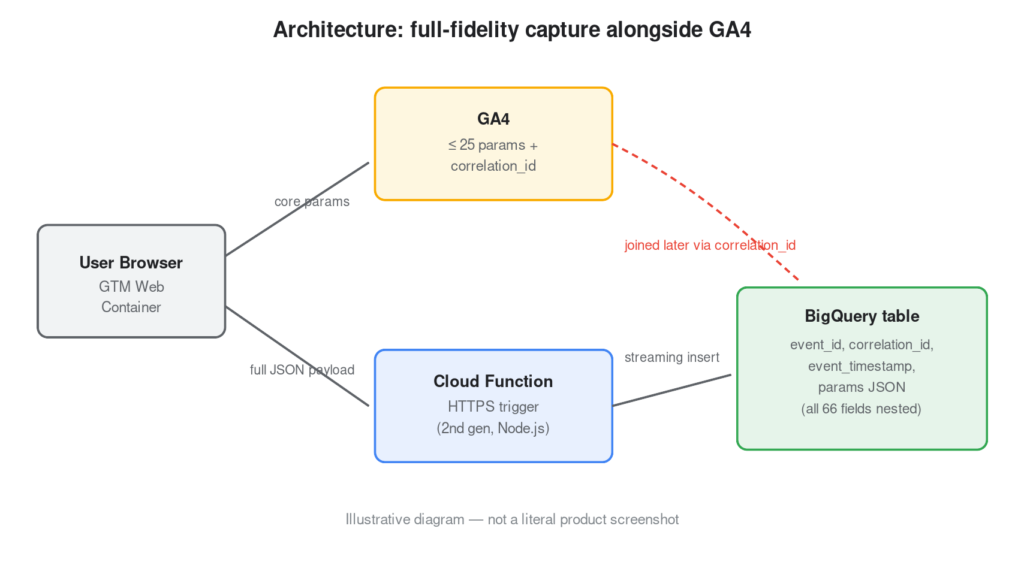
Step 1: Design the payload and the correlation key
Decide the shape of the JSON object you’ll send, and make sure it includes an correlation_id that also gets sent to GA4 as an event parameter. That ID is what lets you join a GA4 row to its full-fidelity BigQuery row later.
{
  "correlation_id": "evt_8f3a1c2b",
  "event_name": "product_view_full",
  "client_id": "1234567890.9876543210",
  "params": {
  "product_detail":{
        product_id: "SKU12345",
        price: 129.99,
        }
   "experiment_detail": {
        experiment_id: "EXP-204",
        recommendation_engine: "collab-filter-v2",
        }
   "user_details": {
        user_id : 'abdcred9876',
        user_tier : 'Bronze',
        login_status : 'logged-in',
        }
  }
}
Step 2: Create the BigQuery dataset and table
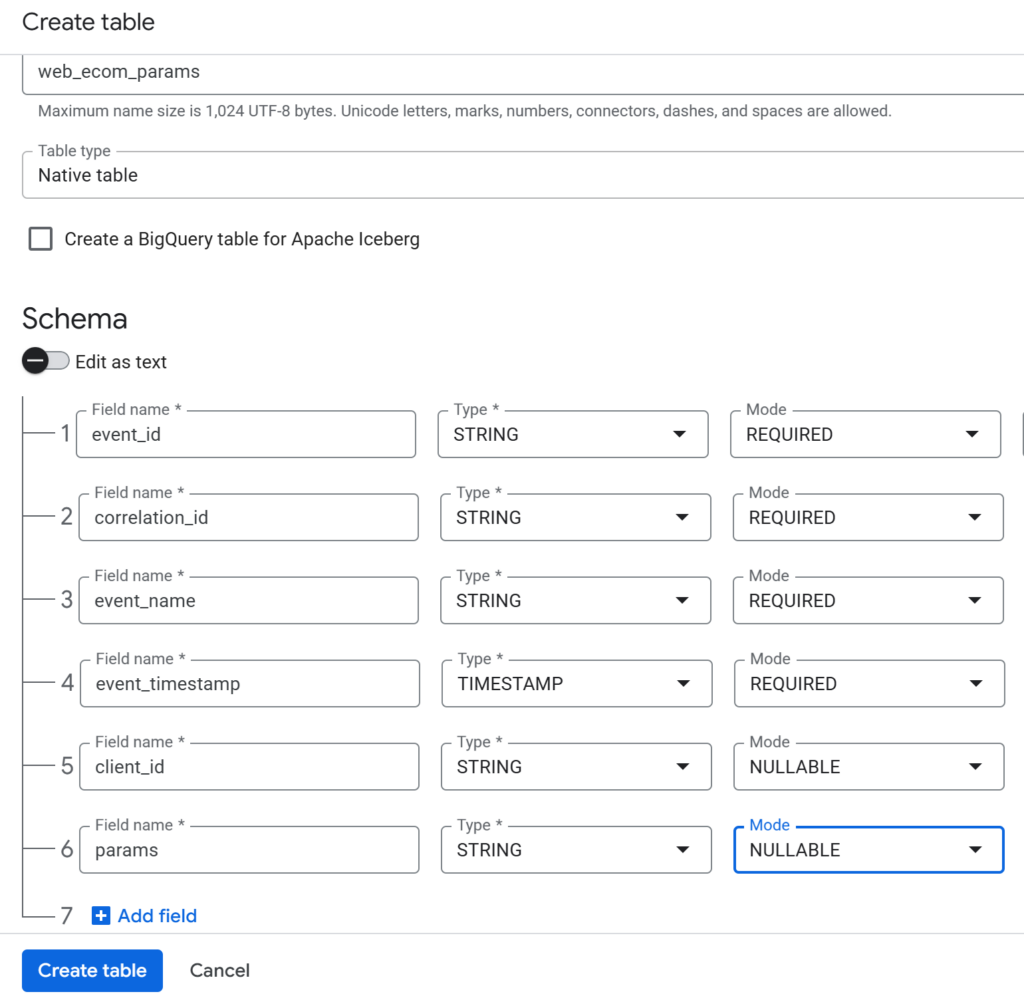
In the console, go to BigQuery > SQL workspace, select your project, and click Create dataset. Inside the dataset, click Create table and define this schema: